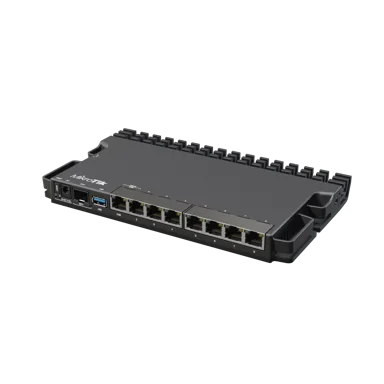
MikroTik RB5009UG+S+IN Router
A compact, high-performance router with 7 Gigabit ports, a 2.5G Ethernet port and a 10G SFP+ cage. It is a popular choice for ISPs, power users and small businesses that need strong routing and VPN throughput.
Key Features
- 7x Gigabit Ethernet, 1x 2.5G Ethernet and 1x 10G SFP+
- Quad-core CPU with 1 GB RAM
- Passive cooling for silent operation
- RouterOS v7 with full routing, firewall and VPN features
Product Details
MikroTik RB5009UG+S+IN Router Price in Kenya – 2.5G Gigabit Router with 10G SFP+
Jupitaz Kenya | SEO-Optimized Ecommerce Product Description

Brand: MikroTik
Model: RB5009UG+S+IN
Category: Business Routers / ISP Routers / Multi-Gigabit Routers
Price: Call for Price
Availability: Listed in stock on Jupitaz
Product specifications verified against MikroTik documentation.
The MikroTik RB5009UG+S+IN Router is a powerful, compact wired router designed for internet service providers (ISPs), business networks, advanced home networks, hotspot deployments and professional network administrators who require reliable routing, multi-gigabit connectivity and flexible network management.
Powered by a Marvell Armada quad-core ARM64 processor, the RB5009UG+S+IN combines seven Gigabit Ethernet ports, one 2.5 Gigabit Ethernet port, one 10Gbps SFP+ interface and a USB 3.0 port in a compact, fanless enclosure.
This combination makes the MikroTik RB5009 particularly suitable for Kenyan businesses and network operators looking to move beyond conventional 1Gbps network connectivity without investing immediately in larger enterprise networking equipment.
The router includes 1GB DDR4 RAM, 1GB NAND storage and a preinstalled RouterOS Level 5 licence. RouterOS provides professional networking capabilities such as advanced firewall configuration, bandwidth management, VLANs, HotSpot services, PPPoE, VPN connectivity and dynamic routing.
Whether you are building an ISP network in Nairobi, managing apartment internet connections, connecting multiple business departments or integrating fibre internet with a managed switch, the MikroTik RB5009UG+S+IN provides a flexible foundation for professional network installations.
One of its most important advantages is the inclusion of both 2.5Gbps Ethernet and 10Gbps SFP+ connectivity, allowing network administrators to integrate faster internet connections, compatible fibre infrastructure and high-performance switches.
Unlike home Wi-Fi routers, the RB5009UG+S+IN does not contain an integrated wireless access point. Wireless coverage requires compatible external access points.
Buy the MikroTik RB5009UG+S+IN Router in Kenya from Jupitaz Networking Solutions or visit the MikroTik RB5009UG+S+IN product page to request current pricing.
MikroTik RB5009UG+S+IN Price in Kenya
The MikroTik RB5009UG+S+IN price in Kenya depends on the supplier, availability and any additional installation accessories or configuration services required.
At the time of checking, Jupitaz displays Call for Price for this model. Customers should therefore request a current quotation before placing an order.
For a complete installation, additional equipment may include compatible SFP+ modules, Ethernet cables, managed switches, wireless access points, fibre optic accessories and a suitable power backup system.
The router is an attractive option for buyers who require an advanced MikroTik device featuring a quad-core processor, multi-gigabit connectivity and RouterOS management in a smaller enclosure.
Explore MikroTik Routers in Kenya to compare other available models.
Key Features and Benefits of MikroTik RB5009UG+S+IN
1. Powerful Marvell Armada Quad-Core ARM64 Processor
The MikroTik RB5009UG+S+IN uses the Marvell 88F7040 quad-core ARM64 processor, with an automatically adjusted operating frequency between 350MHz and 1.4GHz.
Its ARMv8 architecture supports RouterOS v7 networking workloads, providing the processing resources needed for routing, firewall policies, network address translation and other advanced network functions.
The processor is useful for environments requiring:
-
Advanced IP routing and network segmentation
-
Firewall and NAT configuration
-
Multiple internet connections
-
VLAN-based office networks
-
VPN connections between offices
-
HotSpot and PPPoE deployments
-
Bandwidth management and queues
-
Network monitoring and troubleshooting
For a Kenyan ISP or business network, this processing platform provides a foundation for building more complex configurations than those found on typical consumer routers.
However, actual routing throughput depends on packet sizes, connection tracking, firewall rules, bandwidth queues and other enabled services.
MikroTik publishes performance benchmarks under different traffic conditions rather than guaranteeing one fixed throughput for every application.
2. Seven Gigabit Ethernet Ports
The RB5009UG+S+IN includes seven standard 10/100/1000Mbps Ethernet ports.
These ports can connect network equipment such as switches, computers, servers, fibre ONTs and other routers.
RouterOS allows administrators to assign interfaces to different network roles, including WAN, LAN, VLAN trunks and dedicated management networks.
For example, a business may use separate interfaces for staff connectivity, CCTV equipment, guest internet services and network administration.
Although the router supports multiple interface configurations, each standard Gigabit Ethernet port has a maximum negotiated link speed of 1Gbps.
For larger installations, a dedicated managed network switch is generally more practical than connecting every endpoint directly to the router.
Browse Network Switches in Kenya for suitable network expansion equipment.
3. One 2.5 Gigabit Ethernet Port
An important feature of the RB5009UG+S+IN is its dedicated 2.5Gbps Ethernet port.
Unlike ordinary Gigabit Ethernet ports, the 2.5G interface supports faster wired connectivity when connected to compatible 2.5GbE equipment.
This is especially useful for networks incorporating:
-
Multi-gigabit fibre internet connections
-
Compatible 2.5G fibre ONTs
-
Multi-gigabit network switches
-
Network-attached storage systems
-
High-speed servers
-
Business network aggregation
For example, where a compatible fibre service and ONT provide more than 1Gbps of internet bandwidth, the RB5009's 2.5GbE interface can avoid the immediate 1Gbps link-speed limitation of a conventional Gigabit WAN port.
The connected equipment, cables and internet service must also support the required speed.
The 2.5Gbps rating is the interface's nominal link speed and should not be confused with guaranteed internet throughput.
4. One 10Gbps SFP+ Interface
The MikroTik RB5009 features one 10Gbps-capable SFP+ interface for compatible high-speed networking connections.
This port can be used with supported SFP+ transceivers or direct-attach cables for connections to suitable switches and other networking equipment.
Practical applications include:
-
Connecting a 10Gbps distribution switch
-
Linking network infrastructure over compatible fibre
-
Building high-speed network backbones
-
Connecting to compatible aggregation equipment
-
Providing an uplink to a business network core
For an ISP or office using several managed switches, the SFP+ interface can provide a high-speed connection between the router and the distribution network.
The correct optical module, fibre type, wavelength, connector and link distance must be selected for each deployment.
Important: The SFP+ port is an interface capable of 10Gbps link speeds; actual routed throughput depends on the configuration and processing workload. A compatible SFP+ transceiver or cable is purchased separately.
5. Advanced Internal Switch Architecture
All eight Ethernet ports and the SFP+ interface connect through a Marvell 88E6393 switch chip.
MikroTik specifies a 10Gbps full-duplex connection between the switch chip and the Marvell Armada processor.
This architecture provides a high-bandwidth internal connection for handling traffic across the router's wired interfaces.
It is an important design consideration for networks using a mixture of 1Gbps, 2.5Gbps and 10Gbps links.
However, different traffic flows may be processed by the switch chip or CPU depending on RouterOS configuration and the features being used.
Administrators should review MikroTik's performance benchmarks when designing networks with heavy firewall processing, queues or advanced routing policies.
6. 1GB DDR4 RAM and 1GB NAND Storage
The RB5009UG+S+IN includes 1GB DDR4 RAM and 1GB NAND storage.
RAM supports the operation of RouterOS and networking functions such as connection tracking, routing processes and management services.
The NAND storage provides space for the operating system and supported local files.
These resources make the RB5009 suitable for advanced networking configurations, although they do not establish a guaranteed maximum number of users or concurrent sessions.
When planning demanding environments such as busy hotspot networks or ISP aggregation, administrators should evaluate actual traffic patterns and router resource utilisation.
7. MikroTik RouterOS v7 with Level 5 Licence
The router comes with RouterOS v7 and a Level 5 licence.
RouterOS offers extensive configuration flexibility for professional networks.
Key capabilities include:
-
IPv4 and IPv6 routing
-
NAT and firewall filtering
-
Static and dynamic routing
-
VLAN management
-
DHCP server and client functions
-
Bandwidth queues and traffic management
-
HotSpot authentication
-
PPPoE client and server functionality
-
Compatible VPN protocols
-
Policy-based routing
-
Network monitoring and diagnostics
-
Administrative user management
The Level 5 licence is supplied with the device, so buyers do not need to purchase a separate standard RouterOS licence for normal use.
This makes the RB5009 suitable for network administrators who require detailed control over connectivity and security.
8. USB 3.0 Type-A Connectivity
The MikroTik RB5009UG+S+IN includes one USB 3.0 Type-A interface.
The port supports a maximum USB output current of 1.5A and includes USB power-reset functionality.
Depending on RouterOS support and peripheral compatibility, it may be used for suitable storage devices and other supported USB equipment.
It can also be useful in specialised installations where additional storage is required for supported RouterOS applications.
The USB port is not evidence of an integrated cellular modem or SIM slot. External modem functionality requires a specifically compatible USB device and RouterOS configuration.
9. Three Flexible Power Input Options
The RB5009UG+S+IN supports three power input methods:
-
DC power jack
-
PoE input through ether1
-
Two-pin terminal power input
This flexibility is useful for professional installations involving network cabinets, compatible PoE infrastructure or suitable DC power systems.
Ether1 supports IEEE 802.3af/at PoE input.
The manufacturer specifies a maximum power consumption of 25W with attachments and 14W without attachments.
The router does not provide PoE output to power multiple downstream devices. Network administrators requiring power for access points, cameras or radios should select a compatible PoE switch or injector.
10. Silent Fanless Cooling
The RB5009 uses passive cooling, with its enclosure serving as a heat-dissipation structure.
Because the router contains no built-in cooling fan, it operates without fan noise.
This is useful for offices, network cabinets, home laboratories and environments where quiet operation is preferred.
The fanless design also avoids fan-related maintenance, although adequate ventilation and suitable operating temperatures remain essential.
11. Compact Design and Rackmount Expansion
Measuring 220 × 125 × 22mm, the RB5009UG+S+IN is significantly smaller than conventional full-width rackmount routers.
Its compact enclosure allows it to be installed on a desk, shelf or suitable network cabinet.
MikroTik offers a compatible rackmount accessory that can accommodate up to four RB5009 units in one 1U rack space.
This can be particularly useful for organisations operating several routers in a limited equipment cabinet.
The rackmount accessory is optional and should not be assumed to be included in the standard box.
MikroTik RB5009UG+S+IN Technical Specifications
|
Specification |
Details |
|---|---|
|
Brand |
MikroTik |
|
Product model |
RB5009UG+S+IN |
|
Architecture |
ARM 64-bit |
|
CPU |
Marvell 88F7040 |
|
CPU cores |
4 |
|
CPU threads |
4 |
|
CPU frequency |
350–1400MHz automatic |
|
Switch chip |
Marvell 88E6393 |
|
RAM |
1GB DDR4 |
|
Storage |
1GB NAND |
|
Gigabit Ethernet ports |
7 × 10/100/1000Mbps |
|
2.5G Ethernet ports |
1 × 2.5GbE |
|
SFP+ ports |
1 × 10Gbps-capable SFP+ |
|
Total wired networking interfaces |
9 |
|
USB |
1 × USB 3.0 Type-A |
|
Maximum USB current |
1.5A |
|
Operating system |
RouterOS v7 |
|
RouterOS licence |
Level 5 |
|
Wireless connectivity |
No built-in Wi-Fi |
|
PoE input |
IEEE 802.3af/at on ether1 |
|
DC jack input |
24–57V |
|
DC terminal input |
24–57V listed in current product specifications |
|
PoE input range |
24–57V listed in current product specifications |
|
Maximum power consumption |
25W |
|
Power consumption without attachments |
14W maximum |
|
Cooling |
Passive |
|
Dimensions |
220 × 125 × 22mm |
|
Manufacturer-tested operating temperature |
-40°C to +60°C |
|
Rackmount |
Optional K-79 kit |
|
Intended installation |
Indoor |
Source: MikroTik's official RB5009UG+S+IN product specifications and product literature. The official quick guide contains some differing minimum input-voltage values; use the requirements on the actual device and approved power supply before deploying alternative DC or PoE power.
Applications of MikroTik RB5009UG+S+IN Router in Kenya
1. Internet Service Providers and WISPs
The MikroTik RB5009UG+S+IN is suitable for small and growing internet service providers requiring a configurable routing platform.
For Kenyan ISPs deploying fibre-to-the-home (FTTH), wireless internet or managed subscriber networks, the router provides RouterOS services for controlling and organising network traffic.
A typical ISP installation can use the router for PPPoE authentication, bandwidth management, firewall policies and routing between subscriber networks.
The 10Gbps SFP+ interface is particularly useful when connecting to compatible aggregation or distribution equipment.
However, the size of the subscriber network should be determined through capacity planning, including peak throughput, connection rates and processor-intensive services.
For more information about choosing suitable routing equipment, read Jupitaz's MikroTik vs Ubiquiti for Kenyan ISPs guide.
2. Hotspot Billing Systems and Internet Businesses
The RB5009 can form part of a managed hotspot network in apartments, hotels, restaurants, shopping centres and commercial buildings.
RouterOS provides HotSpot services that can be integrated with compatible authentication and billing systems.
A properly configured deployment may support:
-
Customer authentication through a captive portal
-
Time-based or data-based access policies
-
User bandwidth limits
-
Voucher-based access through suitable external software
-
Separate guest and management networks
-
Traffic monitoring and usage control
Hotspot billing integration depends on the selected application and its compatibility with RouterOS.
For example, a hotspot operator might connect the RB5009 to a managed PoE switch supplying several wireless access points.
The router handles network services while the access points provide Wi-Fi coverage.
A real-world installation must account for simultaneous users, internet bandwidth, access-point capacity and the processing overhead of authentication and queues.
3. Office and Corporate Networks
Businesses with multiple departments need network equipment capable of providing controlled connectivity across different parts of their organisation.
The RB5009 supports RouterOS VLAN, routing and firewall functionality that can be used to isolate networks.
For example, an office can establish separate logical networks for administration, finance, employees, guests and surveillance equipment.
The router can then apply policies governing which devices and departments may communicate.
The 2.5GbE and SFP+ interfaces also make the RB5009 useful when connecting to compatible multi-gigabit switches.
This is particularly valuable for businesses with network-attached storage, shared applications or high-volume local network traffic.
4. Fibre Internet and FTTH Deployments
The RB5009 is suitable for fibre internet installations requiring a capable Ethernet router behind a compatible optical network terminal.
For most FTTH connections, the optical service is terminated by an ONT or ONU, which then presents an Ethernet connection to the RB5009.
For faster connections, a compatible 2.5GbE ONT can be connected to the router's 2.5Gbps Ethernet port.
The SFP+ interface may also be used for supported high-speed fibre connections.
Compatibility note: An SFP+ cage is not automatically a GPON or EPON optical-network termination device. The service provider's access technology and approved termination equipment must be considered.
Browse Jupitaz's fibre optic networking equipment for supporting infrastructure products.
5. Starlink Internet Integration
The MikroTik RB5009UG+S+IN can be used alongside compatible Starlink equipment to provide more advanced local network management.
A suitable Ethernet connection from the Starlink system can be connected to the RB5009.
RouterOS can then be configured for network segmentation, firewall protection, traffic management and other routing services.
Businesses operating remote offices, lodges, schools or rural establishments may find this useful when they require more network control than the standard Starlink router provides.
Depending on the Starlink hardware generation, an appropriate Ethernet adapter or compatible connection method may be required.
The RB5009 cannot increase the speed of the underlying Starlink internet service beyond what that connection provides.
6. CCTV Surveillance Networks
The RB5009 can act as a router or gateway for IP-based security networks.
Businesses can use RouterOS to separate CCTV cameras and recording systems from ordinary employee traffic.
This provides additional control over which devices can communicate with sensitive surveillance equipment.
For example, an installation could place cameras on a dedicated VLAN and configure access rules permitting approved monitoring workstations and network video recorders.
Because the RB5009 does not provide PoE output, compatible PoE switches or injectors are required for cameras that depend on Ethernet power.
Explore network switches and PoE equipment for suitable accessories.
7. VPN and Branch Office Connectivity
Organisations with several offices can use RouterOS to establish supported VPN connections between sites.
The RB5009 can be configured with protocols supported by its installed RouterOS version, such as WireGuard or IPsec.
Typical applications include securing remote administration, interconnecting branch offices and controlling access to internal business resources.
VPN performance depends on the selected protocol, encryption, packet size, firewall configuration and available bandwidth.
The router's ARM64 CPU provides a useful platform for these deployments, but administrators should test the required encrypted throughput before production use.
8. Advanced Home Networks and Home Laboratories
MikroTik designed the RB5009 with advanced home users and networking enthusiasts in mind.
The router is suitable for environments requiring multiple VLANs, dedicated server networks, advanced firewall rules and multi-gigabit connectivity.
Its USB 3.0 interface and RouterOS v7 platform can also support certain advanced applications when configured appropriately.
The compact enclosure and passive cooling make it attractive for home laboratories where noise and available space are important.
For wireless connectivity, connect compatible access points such as those available in the Jupitaz wireless access point category.
MikroTik RB5009UG+S+IN Advantages and Disadvantages
Advantages
-
Powerful quad-core ARM64 processor: Provides processing resources for advanced RouterOS networking functions.
-
Multi-gigabit connectivity: Combines seven Gigabit ports, a 2.5GbE port and a 10Gbps-capable SFP+ interface.
-
1GB DDR4 RAM: Supports complex configurations beyond the requirements of many basic home routers.
-
RouterOS Level 5 included: Provides extensive routing, firewall, VPN, HotSpot and traffic-management capabilities.
-
Flexible power options: Supports a DC jack, two-pin terminal and PoE input.
-
USB 3.0 interface: Allows connection of compatible USB peripherals.
-
Compact enclosure: Occupies limited space in network cabinets and desktop installations.
-
Passive cooling: Operates without a built-in fan.
-
Expandable network design: Supports suitable managed switches, fibre equipment and wireless access points.
-
Suitable for multiple applications: Can be configured for business, ISP, hotspot and advanced home networks.
Disadvantages and Limitations
-
No built-in Wi-Fi: A separate wireless access point is necessary.
-
No PoE output: The router cannot directly power Ethernet-connected access points or cameras.
-
Requires technical knowledge: Advanced RouterOS configurations involve a learning curve.
-
Only one 2.5GbE port: Multiple 2.5GbE connections require additional equipment or a suitable network design.
-
Only one SFP+ interface: More high-speed ports require a compatible switch.
-
No integrated cellular modem: Cellular connectivity requires separately supported equipment.
-
Rackmount accessory is optional: The K-79 kit is not part of the standard included accessories.
-
Throughput depends on configuration: Firewall rules, queues, VPN processing and packet sizes can reduce performance compared with simple fast-path benchmark results.
How to Set Up MikroTik RB5009UG+S+IN Router Using Winbox
The MikroTik RB5009UG+S+IN can be configured using Winbox, WebFig or RouterOS command-line tools.
The following instructions describe a typical installation with an Ethernet WAN connection and a private LAN network.
The exact steps can differ if the router has already been configured or reset without its factory-default configuration.
Step 1: Prepare the Required Equipment
Before beginning, prepare the RB5009UG+S+IN router, its compatible power supply, Ethernet cables, a computer and an active internet connection.
For network expansion, you may also require a managed network switch, fibre modules, patch cords or wireless access points.
Check the required ISP connection type before changing router settings.
Step 2: Connect Power
Connect the supplied 24V power adapter to the DC power jack.
Alternatively, use a compatible PoE supply on ether1 or the supported two-pin terminal input.
Only use approved or electrically compatible power sources.
Step 3: Connect Your Internet Source
For a standard factory configuration, connect the upstream internet cable to ether1.
This may be an Ethernet connection from a fibre ONT, compatible Starlink equipment or an ISP modem/router.
Confirm whether the ISP uses DHCP, a static IP address or PPPoE authentication.
Step 4: Connect a Computer to the Router
Connect your computer to a LAN interface such as ether2.
Set the computer's network adapter to obtain an IP address automatically.
Where the factory-default configuration is active, the router normally uses 192.168.88.1 as its LAN management address.
Step 5: Access the Router Using Winbox
Open MikroTik Winbox.
Find the router under the Neighbors tab or connect using its reachable IP address.
For a factory configuration, the default username is normally admin. The initial password may be blank or supplied on the device label, depending on the unit.
Sign in and immediately configure a strong administrator password.
Do not expose Winbox or other management services directly to untrusted internet connections.
Step 6: Configure WAN Internet Connectivity
In Winbox, navigate to:
IP → DHCP Client
For an ISP using DHCP, create or confirm the DHCP client on the intended WAN interface.
For PPPoE connectivity, navigate to:
PPP → Interfaces → PPPoE Client
Enter the credentials supplied by the ISP.
For a static IP connection, configure the assigned IP address, default route and DNS servers.
Check that the router has a valid route to the internet.
Step 7: Configure LAN IP Addressing
Navigate to:
IP → Addresses
Assign a private gateway address to the intended LAN bridge or interface.
For example:
192.168.10.1/24
This address is only an example. Avoid conflicts with existing upstream or downstream subnets.
Configure the LAN DHCP server through:
IP → DHCP Server
Ensure the DHCP pool, gateway and DNS settings are appropriate for the selected LAN network.
Step 8: Configure NAT and Firewall Rules
For a conventional IPv4 private LAN, source NAT is normally required when traffic leaves through the internet connection.
In Winbox, open:
IP → Firewall → NAT
Configure an appropriate source NAT rule for your WAN setup if the default configuration has not already provided one.
Maintain appropriate firewall rules that protect the router itself and control unwanted WAN-to-LAN traffic.
Never disable an operational firewall merely to resolve a connectivity problem.
Step 9: Configure VLANs if Required
For managed office or ISP networks, VLANs can be used to separate different groups of devices.
Possible networks include:
-
Staff LAN
-
Guest internet
-
CCTV
-
Server or management network
-
HotSpot client network
Plan VLAN IDs, bridge membership, trunk ports and IP addressing before applying changes.
On MikroTik devices, incorrect bridge VLAN filtering can disconnect administrative access, so configure a safe recovery method beforehand.
Step 10: Configure HotSpot Services if Required
For a HotSpot deployment, place the intended client-facing interfaces in a suitable dedicated bridge or VLAN.
For example, ether3, ether4 and ether5 could serve customer access networks while ether1 remains a WAN interface.
Open:
IP → Hotspot
Run the HotSpot setup wizard on the correct client-facing interface or bridge.
Provide an appropriate gateway address, DHCP configuration and authentication settings.
If integrating external billing software, configure the required RouterOS API, RADIUS or other supported integration method according to the provider's documentation.
Ensure the HotSpot gateway IP address belongs to the correct client network.
Important: Keep the internet uplink separate from the customer HotSpot bridge unless the chosen network architecture specifically requires and safely handles a different design.
Step 11: Configure SFP+ or 2.5GbE Connectivity
For a compatible 2.5Gbps Ethernet connection, use the dedicated 2.5GbE interface and confirm that the connected equipment negotiates at the expected speed.
For SFP+ connectivity, insert a suitable supported module or DAC cable.
Check the interface status in Winbox.
If a fibre connection does not come up, verify the optical module type, fibre compatibility, connector condition and remote equipment configuration.
Step 12: Secure and Update RouterOS
Before placing the router into production:
-
Set strong administrator credentials.
-
Remove unnecessary administrative access.
-
Restrict management access to trusted networks.
-
Disable services that are not required.
-
Review the firewall.
-
Back up the working configuration.
-
Install an appropriate stable RouterOS version.
Use RouterOS Safe Mode when making potentially disruptive changes during an interactive Winbox session.
Step 13: Test Internet and Local Connectivity
Finally, test the router and connected devices.
Confirm that the WAN has the expected IP address, the default route works and local clients receive DHCP addresses.
Use RouterOS Ping and Traceroute tools to check connectivity.
For example, testing 8.8.8.8 can help determine whether outbound IP connectivity works, while a domain-name test helps check DNS resolution.
Also verify that connected computers can access the internet.
A successful router ping does not automatically confirm that client devices have correct DNS, gateway, NAT and firewall settings.
For HotSpot networks, test the complete customer login process using a real client device.
These installation principles follow MikroTik's official RB5009 quick guide, which identifies ether1 as the standard ISP connection and WebFig or Winbox as supported configuration methods.
MikroTik RB5009UG+S+IN Troubleshooting Guide
|
Problem |
Possible cause |
Recommended solution |
|---|---|---|
|
Router does not power on |
Incorrect power connection or incompatible supply |
Verify the adapter, input voltage and power source. |
|
Cannot access Winbox |
Incorrect IP, LAN connection or firewall settings |
Check local connectivity and use MAC-based discovery where available. |
|
No internet connection |
WAN, routing, DNS or NAT problem |
Verify ISP settings, default route, DNS, NAT and firewall rules. |
|
Connected devices receive no IP address |
DHCP server missing or assigned to the wrong interface |
Check the DHCP server, address pool and bridge membership. |
|
SFP+ link does not work |
Incompatible transceiver, fibre or peer settings |
Check both endpoints, optical specifications and interface status. |
|
2.5G port connects at 1Gbps |
Connected device or cable may limit negotiation |
Confirm 2.5GbE support and use suitable cabling. |
|
HotSpot login page fails |
Incorrect interface, DHCP, DNS or HotSpot configuration |
Check the HotSpot server, gateway and client network. |
|
Slow throughput |
CPU-intensive processing, queues or interface limitations |
Monitor CPU, interface utilisation, firewall and queue statistics. |
|
VPN does not connect |
Firewall, credentials, routing or endpoint issues |
Check the selected VPN protocol and both endpoints. |
|
Router becomes inaccessible after VLAN changes |
Management VLAN or bridge configuration error |
Use an available recovery connection and restore the working configuration. |
MikroTik RB5009UG+S+IN Package Contents
MikroTik's official product information identifies the following standard accessories:
-
MikroTik RB5009UG+S+IN router
-
24V 1.5A power adapter
-
K-55 fastening screw kit
The optional K-79 rackmount kit, SFP+ modules, Ethernet cables, network switches and wireless access points are not listed as standard included parts.
Package contents should be reconfirmed for the specific order, especially where stock is supplied in a different packaging condition.
MikroTik RB5009UG+S+IN vs RB4011iGS+RM
Customers comparing MikroTik routers in Kenya often consider the RB5009 alongside the RB4011.
Both are advanced wired routers running RouterOS, but they have different interface configurations and hardware architectures.
|
Feature |
RB5009UG+S+IN |
RB4011iGS+RM |
|---|---|---|
|
CPU architecture |
ARM64 |
ARM 32-bit |
|
CPU cores |
4 |
4 |
|
RAM |
1GB DDR4 |
1GB |
|
Gigabit Ethernet ports |
7 |
10 |
|
2.5GbE port |
1 |
None |
|
SFP+ interface |
1 |
1 |
|
USB 3.0 |
Yes |
No |
|
Wireless |
No |
No |
|
RouterOS licence |
Level 5 |
Level 5 |
|
Cooling |
Passive |
Passive |
|
Mounting |
Compact, optional rackmount kit |
Rackmount ears included |
The RB5009 is particularly attractive when a network requires 2.5GbE connectivity, USB 3.0 or a compact ARM64 platform.
The RB4011 can be preferable when ten standard Gigabit Ethernet ports and included rackmount hardware better match the installation.
For demanding routed workloads, use comparable manufacturer benchmarks rather than assuming one router always outperforms the other.
Compare with the MikroTik RB4011iGS+RM Router on Jupitaz.
Frequently Asked Questions About MikroTik RB5009UG+S+IN
1. What is the MikroTik RB5009UG+S+IN price in Kenya?
Jupitaz currently displays Call for Price. Customers should contact the store to confirm the latest price and any installation or delivery requirements.
2. Is the MikroTik RB5009UG+S+IN a Gigabit router?
Yes. It includes seven Gigabit Ethernet ports, one 2.5 Gigabit Ethernet port and one 10Gbps-capable SFP+ interface.
3. Does MikroTik RB5009UG+S+IN have built-in Wi-Fi?
No. It is a wired router. A separate wireless access point is required to provide Wi-Fi access.
4. Can I use RB5009UG+S+IN for a hotspot billing business?
Yes. RouterOS supports HotSpot functionality, bandwidth management and compatible external authentication integrations. Third-party billing compatibility should be verified before deployment.
5. Does MikroTik RB5009 support PPPoE?
Yes. RouterOS supports PPPoE client and server functionality. Actual subscriber capacity depends on configuration and workload.
6. Is RB5009 suitable for fibre internet?
Yes. It can connect through a compatible Ethernet ONT or supported optical equipment. Its SFP+ interface does not automatically replace a GPON or EPON ONT.
7. Does the router support 10Gbps connections?
Yes. It has a 10Gbps-capable SFP+ interface. This does not guarantee 10Gbps routing throughput under every configuration.
8. Does the RB5009 provide PoE output?
No. The RB5009UG+S+IN supports PoE input on ether1 but does not provide PoE output to connected devices.
9. Does MikroTik RB5009 support WireGuard VPN?
Yes. WireGuard is supported by compatible RouterOS v7 releases, making it available for suitable remote-access and site-to-site VPN configurations.
10. Can MikroTik RB5009 work with Starlink Internet?
Yes. It can use an Ethernet internet connection from compatible Starlink equipment. The necessary connection method depends on the particular Starlink hardware.
11. How many users can the RB5009 support?
There is no single reliable maximum user count for every installation. Capacity depends on traffic volume, bandwidth requirements, firewall rules, queues and authentication services.
12. Can the RB5009 be installed in a network cabinet?
Yes. It can be placed on a suitable shelf or mounted using a compatible optional rackmount accessory.
13. Can I configure two internet connections on the RB5009?
Yes. RouterOS supports multiple WAN interfaces and appropriate routing configurations for failover or traffic distribution.
14. Is MikroTik RB5009UG+S+IN better than RB4011?
The RB5009 provides 2.5GbE connectivity, USB 3.0 and an ARM64 platform. The RB4011 has more standard Gigabit Ethernet ports. The better model depends on network requirements.
Why Buy MikroTik RB5009UG+S+IN from Jupitaz Kenya?
Jupitaz specialises in networking equipment for Kenyan businesses, ICT technicians, installers and internet service providers.
Customers can explore products across several networking categories, including MikroTik routers, managed switches, wireless access points, fibre equipment and structured cabling accessories.
Choosing the RB5009 from Jupitaz allows buyers to consider compatible networking equipment for their complete installation rather than selecting a router in isolation.
Whether you are building a business network, upgrading ISP infrastructure or deploying a managed hotspot, choosing the correct router and accessories is important for network reliability and future expansion.
Visit the MikroTik router collection at Jupitaz to compare available models.
Buy MikroTik RB5009UG+S+IN Router in Kenya
Upgrade your networking infrastructure with the MikroTik RB5009UG+S+IN Router, featuring a quad-core ARM64 processor, 1GB DDR4 RAM, seven Gigabit Ethernet ports, a 2.5GbE port, 10Gbps SFP+ connectivity and RouterOS v7.
For current prices, availability, compatible accessories and ordering information, visit:
Buy MikroTik RB5009UG+S+IN Router at Jupitaz Kenya
Recommended External Links
The four external product pages you supplied were accessible. Use them sparingly and contextually, keeping Jupitaz as the principal purchase destination.
|
Website |
Recommended anchor text |
|---|---|
|
MikroTik RB5009UG+S+IN technical details |
|
|
MikroTik RB5009UG+S+IN router specifications |
|
|
MikroTik RB5009UG+S+IN configuration information |
|
|
MikroTik RB5009UG+S+IN product information |
For natural placement within the published description, I recommend this paragraph near the technical specifications or product comparison section:
Other detailed product references are available from Orbitlink Solutions, Tawa Kenya, MikroTik Kenya and Reisen SEO. Buyers should use the manufacturer's documentation to verify technical requirements and contact Jupitaz for its current selling price.
SEO recommendation: External links to other retailers are not essential for ranking a product page and may send prospective customers away from Jupitaz. Use them only where they provide genuine additional value. Manufacturer documentation is the strongest external reference for product specifications.
Jupitaz Internal Links
These verified Jupitaz sections are suitable for contextual internal linking.
|
Internal page |
Suggested anchor |
|---|---|
|
MikroTik routers in Kenya |
|
|
Business and ISP routers |
|
|
Managed network switches |
|
|
Wireless access points |
|
|
Fibre optic networking equipment |
|
|
PoE injectors and switches |
|
|
MikroTik vs Ubiquiti for ISPs |
SEO Metadata
SEO Meta Title
CopySEO Meta Description
CopyPrimary Focus Keyword
MikroTik RB5009UG+S+IN Router Price in Kenya
Secondary Keywords
MikroTik RB5009 Kenya, MikroTik RB5009 price Kenya, RB5009UG+S+IN specifications, MikroTik 2.5G router, MikroTik 10G SFP+ router, MikroTik ISP router Kenya, MikroTik RB5009 setup, RouterOS v7 router Kenya.
Existing Product URL
https://jupitaz.co.ke/product/mikrotik-rb5009ug-s-inSEO Publication Recommendations
To improve this product page beyond its description, Jupitaz should use original or manufacturer-approved product images with descriptive alt text, link the page from relevant router categories, and show accurate price, availability and warranty information.
Implement Product structured data using the product's verified model, brand, image and actual offer details. Add BreadcrumbList structured data for its category hierarchy. Do not create invented review ratings, prices or customer testimonials.
The product page should also have one primary H1 heading, a unique canonical URL and descriptive image filenames. Ensure that the body content does not simply duplicate the external retailer descriptions.
Primary technical sources: MikroTik official RB5009UG+S+IN specifications and MikroTik official installation quick guide.
This description follows your master outline, retains Jupitaz-specific pricing and purchase links, and uses the exact RB5009UG+S+IN specifications rather than those of other RB5009 variants.
Technical Specifications
| Ports | 7x Gigabit, 1x 2.5G Ethernet, 1x 10G SFP+ |
|---|---|
| CPU | Marvell 88F7040 quad-core 1.4 GHz |
| RAM | 1 GB |
| USB | 1x USB 3.0 |
| Operating System | RouterOS v7 (L5 licence) |
| Form Factor | Desktop / rackmount |
Why Buy From Jupitaz
Jupitaz is a networking-focused equipment supplier serving customers in Kenya. We list a specialist range of routers, switches, wireless and fibre products so you can compare current pricing and availability in one place. Our team can help you choose the right equipment for home, business, ISP or FTTH projects, and delivery options are available across Kenya.
Frequently Asked Questions
Related Products

