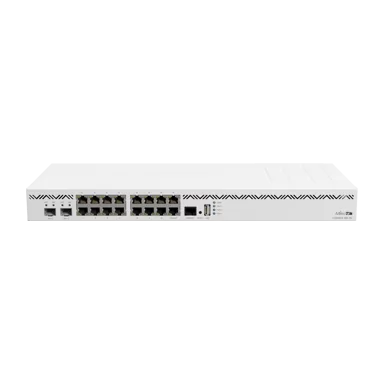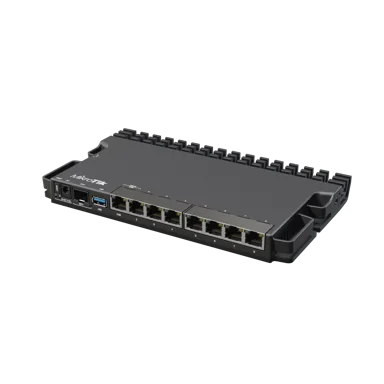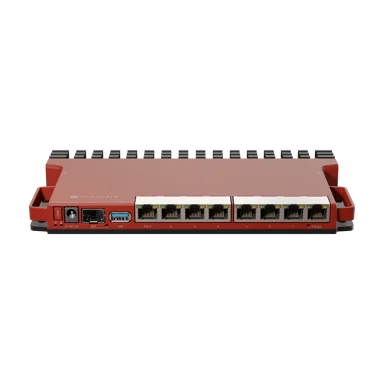
MikroTik L009UiGS-RM Router
A 1U rackmount router with 8 Gigabit ports and an SFP cage. The L009UiGS-RM offers improved routing and filtering performance for growing business networks.
Key Features
- 8x Gigabit Ethernet and 1x SFP
- 1U rackmount
- PoE input support
- RouterOS v7
Product Details
MikroTik L009UiGS-RM Router Overview
The MikroTik L009UiGS-RM Router is a professional-grade, eight-port Gigabit Ethernet router designed for small and medium-sized businesses, internet service providers (ISPs), hotspot operators, network administrators and organisations requiring advanced wired networking capabilities.
Equipped with a dual-core 800MHz ARM processor, 512MB RAM, eight Gigabit Ethernet ports, one 2.5Gbps-capable SFP interface and a USB 3.0 port, the L009UiGS-RM provides flexible networking capabilities in a compact, rackmountable enclosure.
The router runs MikroTik RouterOS v7 with an included Level 5 licence, providing extensive configuration options for internet routing, network security, VLANs, bandwidth management, HotSpot authentication, PPPoE, compatible VPN connections and network monitoring.
Developed as a successor to the MikroTik RB2011 product family, the L009 offers updated hardware, improved processing capabilities and Gigabit Ethernet connectivity across all eight copper network interfaces.
For businesses and internet providers in Kenya, this makes the router a practical option for upgrading ageing networking infrastructure while retaining advanced RouterOS management features.
Its 2.5Gbps-capable SFP interface enables connections to compatible Gigabit and 2.5Gbps fibre networking equipment, while passive PoE output on ether8 can power an electrically compatible device.
The router also features a metal enclosure that acts as a passive heatsink, allowing fanless operation and efficient installation in networking cabinets.
Unlike a wireless router, the L009UiGS-RM does not include built-in Wi-Fi. Wireless connectivity requires separately connected access points.
Whether you are managing an office network, building a hotspot service, connecting a fibre internet installation or upgrading an ISP distribution network, the MikroTik L009UiGS-RM provides a versatile platform for professional network management.
For additional product information, customers can review the MikroTik L009UiGS-RM Router at Orbitlink Solutions, while Jupitaz provides its own product listing for buyers looking to purchase the router in Kenya.
Buy MikroTik L009UiGS-RM Router in Kenya from Jupitaz Networking Solutions and request current pricing, availability and compatible networking accessories.
MikroTik L009UiGS-RM Price in Kenya
The MikroTik L009UiGS-RM price in Kenya varies depending on current supplier pricing, availability, import costs and additional equipment required for installation.
Jupitaz currently lists the router as Call for Price, so customers should request an updated quotation before ordering.
When planning a complete network installation, additional costs may include Ethernet cables, compatible SFP transceivers, fibre optic patch cords, wireless access points, managed network switches and installation services.
The L009UiGS-RM is particularly suitable for buyers who need multiple Gigabit Ethernet ports, advanced RouterOS features and a rackmountable design without investing in a larger enterprise router.
Customers comparing router specifications and pricing across Kenyan networking suppliers can also explore the MikroTik L009UiGS-RM listing on Tawa Kenya.
However, the selling price, stock status and applicable terms for purchases through Jupitaz should always be confirmed directly with Jupitaz.
Browse the MikroTik routers available at Jupitaz to compare alternative models for business, hotspot and ISP networking requirements.
Key Features and Benefits of MikroTik L009UiGS-RM Router
1. Dual-Core 800MHz ARM Processor
The MikroTik L009UiGS-RM is powered by a Qualcomm IPQ-5018 dual-core processor operating at a nominal frequency of 800MHz.
The router uses an ARM-based processing platform designed to support RouterOS v7 networking functions.
Its processing capabilities make it suitable for tasks such as:
-
Internet routing and network address translation
-
Firewall filtering and connection tracking
-
DHCP server and client configuration
-
VLAN and network segmentation
-
Bandwidth management and traffic queues
-
HotSpot authentication
-
PPPoE services
-
Compatible VPN connections
-
Network monitoring and diagnostics
Compared with the older RB2011 family, MikroTik reports substantial performance improvements in several routing and filtering scenarios.
This makes the L009 attractive for organisations that want to replace older routers while retaining familiar RouterOS configuration tools.
Actual network throughput depends on packet sizes, enabled firewall rules, bandwidth queues, encryption and other processing requirements.
The router's performance should therefore be evaluated according to the intended workload rather than assuming that every configuration will achieve the theoretical maximum interface speeds.
2. Eight Gigabit Ethernet Ports
The L009UiGS-RM includes eight 10/100/1000Mbps Ethernet ports.
These ports provide wired connectivity for network equipment such as computers, managed switches, fibre ONTs, servers, access points and other routers.
Each Ethernet port supports a maximum negotiated link speed of 1Gbps when connected to compatible equipment and cabling.
RouterOS allows administrators to assign the ports to different network functions, such as:
-
Primary internet WAN connection
-
Office LAN network
-
Guest internet network
-
CCTV and surveillance network
-
HotSpot subscriber network
-
Managed switch uplink
-
Dedicated management network
-
Additional routed or VLAN-connected networks
For example, a business may configure ether1 as its internet uplink while other Ethernet ports connect to office equipment and managed switches.
These assignments are flexible and depend on the network design.
The eight-port configuration is particularly useful for smaller installations where several wired network connections are required.
For larger networks, additional devices can be connected through compatible Gigabit network switches available at Jupitaz.
3. 2.5Gbps-Capable SFP Interface
One of the defining features of the MikroTik L009UiGS-RM is its SFP cage supporting compatible Gigabit and 2.5Gbps connections.
This interface provides additional flexibility for connecting compatible fibre optic infrastructure and high-speed networking equipment.
Typical applications include:
-
Connecting compatible fibre distribution equipment
-
Establishing building-to-building fibre links
-
Connecting supported network switches
-
Fibre connections within business networks
-
Small ISP distribution infrastructure
-
Network backbone connections using supported transceivers
The 2.5Gbps capability can be valuable when the connected module and remote equipment support the required link speed.
However, the interface should not be confused with a standard 10Gbps SFP+ connection.
The L009UiGS-RM does not offer a 10Gbps SFP+ interface.
A compatible SFP transceiver or cable is also required and is not automatically included with the router.
For businesses planning fibre networking projects, Jupitaz offers fibre optic equipment and accessories for different installation requirements.
4. 512MB RAM for Advanced RouterOS Operations
The MikroTik L009UiGS-RM includes 512MB DDR3L RAM.
This memory supports RouterOS services, routing processes, connection tracking, firewall functions and other configured network tasks.
Compared with older MikroTik routers that have significantly less memory, the L009 provides additional resources for professional networking applications.
For example, a small office may configure VLANs, firewall rules, DHCP services and bandwidth management on the same router.
The available RAM supports these types of configurations, although practical capacity depends on the number of active connections and services.
Important: The correct manufacturer specification is 512MB RAM, not 1GB.
5. RouterOS v7 with Level 5 Licence
The MikroTik L009UiGS-RM comes with RouterOS v7 and an included Level 5 licence.
RouterOS is a professional networking operating system that provides detailed control over routing, security and traffic management.
Supported networking functions include:
-
IPv4 and IPv6 configuration
-
Static and dynamic routing
-
Network address translation
-
Firewall filtering
-
DHCP server and client functions
-
VLAN configuration
-
Bandwidth queues
-
HotSpot authentication
-
PPPoE client and server services
-
Compatible VPN protocols
-
Network diagnostics
-
Administrative access control
-
Configuration scripting and automation
The included Level 5 licence enables supported RouterOS functions without purchasing a separate standard software licence.
This flexibility makes the router suitable for network administrators who require more control than a basic consumer router provides.
6. Passive PoE Output on Ether8
The L009UiGS-RM supports passive Power over Ethernet output on ether8.
This allows the router to supply power and network connectivity to a compatible device through an Ethernet cable.
Potential applications include powering a suitable MikroTik access point or another supported low-power networking device.
An important limitation is that PoE output works only when the L009 is powered through its DC jack.
The output voltage follows the router's DC input voltage, subject to the manufacturer's electrical restrictions.
MikroTik specifies the following PoE output current limits:
-
Up to 1A for the lower supported voltage range
-
Up to 450mA for the higher supported voltage range
The connected device must support the supplied voltage, current and passive PoE pinout.
Passive PoE output is not automatically compatible with IEEE 802.3af/at powered devices.
For networks requiring several powered access points or IP cameras, a dedicated PoE network switch is generally more appropriate.
7. IEEE 802.3af/at PoE Input Support
The MikroTik L009UiGS-RM can receive power through ether1 from a compatible IEEE 802.3af/at PoE source.
The manufacturer specifies an input voltage range of 24–56V DC.
This provides flexibility for suitable network installations.
For example, an installer may power the router using an appropriate PoE switch or injector rather than placing a separate electrical power adapter next to the device.
However, the router's PoE output function on ether8 requires DC-jack power and should not be assumed to operate when the router is powered only through PoE input.
8. USB 3.0 Port for Additional Connectivity
The L009UiGS-RM includes one USB 3.0 Type-A interface.
This interface can connect compatible USB peripherals, including supported external storage devices and certain supported cellular modems.
USB connectivity is particularly useful for specialised RouterOS installations that require additional peripheral functions.
The port supports a maximum USB current of 1.5A.
USB modem functionality depends on the exact modem and installed RouterOS release.
The router does not include an integrated SIM slot or built-in 4G/5G cellular modem.
9. IPsec Hardware Acceleration
The MikroTik L009UiGS-RM supports hardware-assisted IPsec encryption.
This feature can improve performance for compatible IPsec VPN configurations.
Businesses can use supported VPN functionality to establish encrypted connections between office locations or authorised remote networks.
For example, a company with branches in Nairobi and Nakuru may establish a site-to-site VPN for controlled access to selected internal resources.
However, IPsec throughput depends on encryption settings, packet sizes and routing configuration.
MikroTik describes approximately 60–90Mbps in a particular 1,400-byte packet IPsec test scenario.
This is not a guarantee for every VPN connection, and other VPN protocols may perform differently.
10. Efficient 1U Rackmount Design
The L009UiGS-RM uses a compact metal enclosure designed for space-efficient networking installations.
Its dimensions are approximately 220 × 125 × 22mm.
The enclosure acts as a passive heatsink, allowing the router to operate without a built-in fan.
This makes it suitable for offices, network cabinets, small server rooms and other protected indoor environments.
The RM version includes the manufacturer's rackmount accessories.
MikroTik's K-79 mounting system allows up to four compatible L009 or RB5009 form-factor units to occupy one standard 1U rack space.
This can be especially useful for network administrators managing multiple routers within a limited cabinet.
11. Gigabit Switch Chip Architecture
The L009UiGS-RM uses the Marvell 88E6190 switch chip.
MikroTik's design provides a 2.5Gbps full-duplex connection between the switch chip and the CPU for the applicable interfaces, while ether1 has a separate Gigabit full-duplex connection to the processor.
This architecture is important when evaluating traffic flow between Ethernet interfaces and the processor.
Actual aggregate network throughput depends on traffic patterns, switching behaviour, hardware offloading and RouterOS processing requirements.
The 2.5Gbps internal connection does not mean that every routed connection will deliver 2.5Gbps throughput.
12. RouterOS Container Support
The ARM-based L009 platform supports RouterOS container functionality on compatible RouterOS versions.
This allows advanced administrators to deploy suitable containerised applications where the router's resources and storage arrangement meet the application's requirements.
Container installations may require external storage, additional packages and careful consideration of security and performance.
Containers are an advanced feature and are not necessary for ordinary office routing, HotSpot or internet-sharing configurations.
For customers interested in comparing RouterOS capabilities with alternative devices, the MikroTik L009UiGS-RM product information from Reisen SEO offers another relevant Kenyan product reference.
13. Silent Fanless Cooling
The router uses passive cooling and does not rely on a mechanical fan.
This eliminates fan noise and avoids fan-related maintenance.
Its compact heatsink enclosure is designed to dissipate heat during normal operation.
Although the manufacturer specifies a broad tested operating temperature range, the router should be installed in a dry, ventilated environment with adequate airflow.
The IP20 enclosure is not waterproof and is not designed for direct exposure to rain.
MikroTik L009UiGS-RM Technical Specifications
| Specification | Details |
|---|---|
| Manufacturer | MikroTik |
| Product name | L009UiGS-RM |
| CPU | Qualcomm IPQ-5018 |
| CPU architecture | ARM, 32-bit RouterOS |
| CPU cores | 2 |
| CPU threads | 2 |
| CPU frequency | 800MHz |
| Switch chip | Marvell 88E6190 |
| RAM | 512MB DDR3L |
| Storage | 128MB NAND |
| Ethernet ports | 8 × 10/100/1000Mbps |
| SFP interface | 1 × SFP, supports compatible 2.5Gbps connections |
| 10Gbps SFP+ | Not supported |
| USB | 1 × USB 3.0 Type-A |
| Maximum USB current | 1.5A |
| Serial console | RJ45 |
| RouterOS version | RouterOS v7 |
| RouterOS licence | Level 5 |
| Built-in Wi-Fi | No |
| PoE input | IEEE 802.3af/at on ether1 |
| PoE input voltage | 24–56V DC |
| Passive PoE output | Ether8 |
| PoE output requirement | DC-jack power |
| PoE output current | Up to 1A or 450mA, depending on voltage |
| DC jack input | 24–56V DC |
| Maximum power consumption | 40W with attachments |
| Maximum consumption without attachments | 8W |
| Cooling | Passive |
| Dimensions | 220 × 125 × 22mm |
| Rackmount support | K-79 rackmount accessories |
| Tested ambient temperature | -40°C to +70°C |
| IP protection rating | IP20 |
| IPsec hardware acceleration | Supported |
| Installation environment | Indoor |
The specifications above refer to the exact L009UiGS-RM model, not the wireless L009UiGS-2HaxD-IN variant.
Practical Applications of MikroTik L009UiGS-RM Router in Kenya
1. Office and Corporate Networking
The MikroTik L009UiGS-RM is suitable for small and medium-sized offices requiring a configurable wired router.
Its eight Gigabit Ethernet ports allow administrators to connect network switches, workstations, servers and access points.
RouterOS supports VLANs and firewall policies that can separate different business departments.
For example, a business may create separate networks for administration, finance, employees, guest access and CCTV equipment.
Suitable firewall rules can then control communication between these networks.
For larger installations, a managed switch can extend the network while maintaining VLAN separation.
2. Hotspot Billing Systems and Managed Wi-Fi
The L009UiGS-RM can be used as the central wired router in a managed hotspot network.
RouterOS provides HotSpot authentication, user profiles, bandwidth management and integration capabilities for compatible external billing systems.
Suitable environments include:
-
Hotels and guesthouses
-
Apartment buildings
-
Restaurants and cafés
-
Commercial centres
-
Small educational institutions
-
Managed residential internet networks
A typical hotspot installation includes the router, suitable network switches, wireless access points and a compatible authentication or billing platform.
The router manages traffic, while separate access points provide Wi-Fi coverage.
The number of simultaneous users depends on the actual network configuration, traffic load, internet capacity and authentication requirements.
3. Small Internet Service Providers
For small ISPs and wireless internet providers, the L009 can provide routing, PPPoE, firewall and bandwidth-management services.
Its Gigabit Ethernet ports can connect upstream internet services and distribution equipment.
The SFP interface also enables compatible fibre network integration.
For example, a small WISP may use the router as a gateway connecting its upstream service to an access-point distribution network.
Large ISP networks or deployments requiring higher sustained throughput should consider more powerful routers such as the MikroTik RB5009UG+S+IN.
4. Fibre Internet and FTTH Connections
The MikroTik L009UiGS-RM supports fibre networking through compatible SFP modules.
It can also connect to ordinary Ethernet-based fibre ONTs.
This flexibility is useful for businesses receiving internet services through fibre infrastructure.
For instance, an office may connect its ISP-supplied ONT to ether1 and use the router's remaining Ethernet ports for network distribution.
Alternatively, a suitable SFP module may be used for a supported fibre Ethernet connection.
The SFP port does not automatically replace a GPON or EPON ONT.
5. Hotel and Guesthouse Networks
Hotels and guesthouses require networks that can separate guest traffic from internal administrative systems.
The L009 can be configured with VLANs, firewall rules and HotSpot services to support such arrangements.
For example, a hotel can maintain separate networks for reception, staff, guest internet and CCTV equipment.
Wireless access points can then provide coverage across guest rooms and common areas.
The router itself does not broadcast Wi-Fi.
6. CCTV and Security Networks
The L009 can be used as a wired gateway for IP surveillance installations.
A business may connect a managed PoE switch to the router and assign cameras to a dedicated VLAN.
Firewall rules can restrict access to surveillance equipment.
This design is useful for offices, shops, hotels and institutions where CCTV systems should be isolated from ordinary employee traffic.
The router's single passive PoE output is not a replacement for a multiport CCTV PoE switch.
7. Starlink Internet Network Management
The L009UiGS-RM can operate behind compatible Starlink internet equipment through an Ethernet connection.
RouterOS can provide network segmentation, firewall protection, bandwidth control and other services not necessarily available through basic consumer-router interfaces.
For example, an organisation using Starlink may use the L009 to connect staff networks, guest internet, CCTV and wireless access points.
The necessary Ethernet adapter or connection method depends on the Starlink hardware.
8. VPN Connectivity Between Business Locations
Businesses with several branches can use supported RouterOS VPN features to connect remote networks securely.
Possible applications include linking branch offices, supporting remote administration and enabling authorised access to internal services.
IPsec hardware acceleration can benefit compatible encrypted connections.
However, businesses requiring consistently high encrypted throughput should evaluate the manufacturer's performance results and consider their intended VPN configuration.
9. Networking Laboratories and IT Training
The L009 is also useful for networking enthusiasts, ICT students and technical laboratories.
RouterOS provides tools for learning and practising routing, VLANs, firewall configuration, VPNs, bandwidth management and network monitoring.
The RJ45 serial console interface can assist administrators with direct access and troubleshooting.
Its rackmountable design also makes it suitable for organised training environments with several router units.
MikroTik L009UiGS-RM Advantages and Disadvantages
Advantages
-
Eight Gigabit Ethernet ports: Suitable for connecting multiple wired networking devices.
-
2.5Gbps-capable SFP interface: Supports compatible high-speed fibre networking connections.
-
Dual-core ARM processor: Provides improved performance compared with several older MikroTik platforms.
-
512MB RAM: Supports professional RouterOS configurations.
-
RouterOS Level 5: Includes advanced routing, firewall, HotSpot and VPN features.
-
PoE input support: Provides flexible power options on ether1.
-
Passive PoE output: Ether8 can power a compatible device when the router uses DC-jack power.
-
USB 3.0 interface: Supports compatible storage and peripherals.
-
Rackmount accessories: Suitable for compact network cabinets.
-
Fanless metal enclosure: Provides silent operation and passive heat dissipation.
-
Serial console access: Useful for advanced configuration and troubleshooting.
-
RouterOS container capability: Available for appropriately configured advanced applications.
Disadvantages and Limitations
-
No built-in Wi-Fi: Requires separate wireless access points.
-
No 10Gbps SFP+ interface: Supports up to 2.5Gbps on compatible SFP connections.
-
Not intended for high-end core routing: Larger ISP networks may require more powerful hardware.
-
Advanced configuration requires technical knowledge: RouterOS has a learning curve.
-
PoE output restrictions: Ether8 output requires DC-jack power and compatible powered devices.
-
Only one SFP cage: Additional fibre connections may require a switch.
-
No integrated cellular modem: Mobile broadband requires compatible external equipment.
-
Throughput depends on workload: Firewall rules, queues and VPN encryption can reduce routing performance.
How to Set Up MikroTik L009UiGS-RM Router Using Winbox
The MikroTik L009UiGS-RM can be configured using Winbox, WebFig or RouterOS command-line tools.
The steps below describe a typical installation with an Ethernet WAN connection and a private LAN network.
Step 1: Prepare the Router and Networking Equipment
Prepare the MikroTik L009UiGS-RM, compatible power adapter, Ethernet cables, a computer and an active internet connection.
For network expansion, you may also need managed switches, wireless access points or compatible SFP modules.
Step 2: Connect Power
Connect the supplied compatible power adapter to the router's DC input jack.
Alternatively, use a supported PoE source on ether1.
Ensure the power supply meets the router's 24–56V input requirements.
Step 3: Connect the Internet Cable
Connect the internet connection from the ISP modem, fibre ONT or upstream router to ether1.
In a standard factory configuration, this interface normally serves as the WAN connection.
If the router has been configured previously, confirm the active interface assignments before proceeding.
Step 4: Connect Your Computer
Connect your computer to ether2 or another configured LAN port.
Set the network adapter to obtain an IP address automatically.
For a standard factory configuration, the router typically uses 192.168.88.1 as its LAN management address.
Step 5: Access the Router Through Winbox
Open MikroTik Winbox.
Use the Neighbors tab to discover the router or connect through its reachable management IP address.
The default administrator username is normally admin. The initial password may be blank or printed on the device label, depending on the specific device.
Set a strong administrator password immediately after login.
Step 6: Configure Internet Connectivity
Navigate to:
IP → DHCP Client
For internet services using automatic addressing, confirm or create a DHCP client on the WAN interface.
For PPPoE, use:
PPP → Interfaces → PPPoE Client
Enter the ISP credentials.
For static IP connections, configure the assigned IP address, default gateway and DNS information.
Verify that the router has a working default route.
Step 7: Configure LAN Addressing
Open:
IP → Addresses
Assign the desired gateway IP address to the correct LAN bridge or interface.
For example:
192.168.10.1/24
Then navigate to:
IP → DHCP Server
Configure the address pool, gateway and DHCP options for the intended client network.
Ensure the LAN network does not conflict with the upstream subnet.
Step 8: Configure NAT and Firewall Rules
For conventional private IPv4 networks, source NAT is normally required for internet sharing.
Navigate to:
IP → Firewall → NAT
Confirm the correct source NAT configuration exists.
Review the firewall filter rules to protect administrative access and prevent unwanted traffic from the internet.
Do not remove working default firewall protections without understanding their purpose.
Step 9: Configure VLANs if Required
RouterOS supports VLAN configuration for separating network segments.
For example, you may establish dedicated VLANs for:
-
Office users
-
Guest internet
-
CCTV
-
Management devices
-
HotSpot customers
Use a managed network switch if multiple VLANs need to share a downstream Ethernet uplink.
Incorrect VLAN filtering can block management access, so use a safe recovery method when applying changes.
Step 10: Configure HotSpot Services
For a HotSpot installation, select or create the correct client-facing bridge or VLAN.
For example, ether3, ether4 and ether5 may be assigned to the client HotSpot network while ether1 remains the internet WAN.
Open:
IP → Hotspot
Run the HotSpot setup wizard and select the correct client-facing interface.
Configure the gateway, address pool, DNS and authentication settings.
If integrating third-party billing software, follow the platform's RouterOS compatibility and authentication requirements.
Avoid bridging the WAN into the client HotSpot network.
Step 11: Configure SFP Connectivity
Insert a compatible SFP transceiver into the router.
Connect the appropriate fibre cable and verify the remote device's specifications.
Check the interface status through Winbox.
If the connection fails, verify module compatibility, optical wavelength, fibre type and negotiated speed.
Step 12: Configure PoE Output if Required
When using ether8 to power a compatible device, verify its voltage, current and passive PoE requirements.
Remember that PoE output works only when the L009 is powered through its DC jack.
Enable an appropriate PoE output mode through RouterOS.
Avoid forcing PoE output unless the connected equipment is confirmed compatible.
Step 13: Update and Secure RouterOS
Before placing the router into production:
-
Set strong administrator credentials.
-
Update to an appropriate stable RouterOS version.
-
Review the firewall configuration.
-
Restrict management services to trusted networks.
-
Disable unnecessary services.
-
Save a backup of the configuration.
-
Use Safe Mode when making potentially disruptive changes.
Step 14: Test Internet and Local Connectivity
Confirm that the router receives the expected WAN IP address.
Check the default gateway, DNS resolution, NAT and firewall settings.
Use RouterOS Ping and Traceroute tools for connectivity testing.
Verify internet access from connected client devices.
For HotSpot deployments, test the captive portal and authentication process from a customer device.
A successful ping from the router does not automatically prove that LAN clients have internet access.
MikroTik L009UiGS-RM Troubleshooting Guide
| Problem | Possible cause | Recommended solution |
|---|---|---|
| Router does not power on | Incorrect supply or voltage | Verify the DC adapter or PoE input. |
| Cannot access Winbox | Incorrect IP or disconnected LAN | Check physical connectivity and MAC discovery. |
| No internet connection | WAN, route, DNS, NAT or firewall issue | Verify ISP settings and router configuration. |
| Clients receive no IP address | Incorrect DHCP or bridge setup | Check DHCP server and interface assignment. |
| SFP connection fails | Incompatible optical module or fibre | Verify transceiver, wavelength and remote endpoint. |
| Ether8 PoE output fails | Router powered only by PoE input | Use compatible DC-jack power and check output requirements. |
| Slow routing performance | Complex queues or firewall rules | Monitor CPU utilisation and configuration. |
| HotSpot login page fails | Incorrect HotSpot interface or DNS | Check client network, gateway and HotSpot settings. |
| VPN fails to establish | Credentials, routing or firewall errors | Verify both VPN endpoints and their configurations. |
| Router becomes inaccessible | Bridge, VLAN or IP configuration change | Use a recovery connection or restore a working backup. |
MikroTik L009UiGS-RM Package Contents
The standard manufacturer's package includes:
-
MikroTik L009UiGS-RM router
-
24V 1.5A power adapter
-
K-79 rackmount kit
-
K-55 fastening screw kit
-
K-87 mounting accessories
-
Adhesive pads
Exact packaging and included accessories should be confirmed when ordering, especially where a product is supplied in opened-box or previously used condition.
SFP modules, Ethernet cables, fibre patch cords, wireless access points and external storage are not listed as standard included items.
MikroTik L009UiGS-RM vs Other MikroTik Routers
| Feature | L009UiGS-RM | RB4011iGS+RM | RB5009UG+S+IN |
|---|---|---|---|
| CPU | Dual-core 800MHz ARM | Quad-core 1.4GHz ARM | Quad-core Marvell ARM64 |
| RAM | 512MB | 1GB | 1GB |
| Gigabit Ethernet | 8 ports | 10 ports | 7 ports |
| 2.5GbE Ethernet | No | No | 1 port |
| SFP/SFP+ | 1 × 2.5G-capable SFP | 1 × 10G SFP+ | 1 × 10G SFP+ |
| USB | USB 3.0 | No | USB 3.0 |
| PoE output | Ether8 passive | Ether10 passive | No |
| RouterOS licence | Level 5 | Level 5 | Level 5 |
| Wi-Fi | No | No | No |
| Typical use | Small and medium business networks | More demanding wired networks | Advanced business and ISP networks |
The L009UiGS-RM is suitable for businesses seeking multiple Gigabit Ethernet ports, a 2.5Gbps-capable SFP interface and advanced RouterOS management.
The RB4011 provides more standard Gigabit Ethernet ports and a 10Gbps SFP+ interface.
The RB5009 offers a more powerful ARM64 platform and additional multi-gigabit connectivity options.
The best router depends on expected traffic volume, interface requirements and enabled RouterOS services.
Frequently Asked Questions About MikroTik L009UiGS-RM
1. What is the MikroTik L009UiGS-RM price in Kenya?
Jupitaz currently lists the router as Call for Price. Contact the store for updated pricing and ordering information.
2. Is the MikroTik L009UiGS-RM a Gigabit router?
Yes. It includes eight Gigabit Ethernet ports and one SFP interface supporting compatible connections up to 2.5Gbps.
3. Does the L009UiGS-RM have Wi-Fi?
No. This is the wired rackmount version. Separate wireless access points are required.
4. Can the L009UiGS-RM be used for hotspot billing?
Yes. RouterOS supports HotSpot authentication, queues and integration options for compatible external billing systems.
5. Does MikroTik L009UiGS-RM support PPPoE?
Yes. RouterOS supports PPPoE client and server functionality.
6. Can I connect fibre internet directly to the L009?
The router accepts compatible SFP transceivers. For GPON or EPON services, an appropriate ONT or approved termination method is still required.
7. Does L009UiGS-RM have PoE output?
Yes. Ether8 supports passive PoE output when the router is powered through its DC jack.
8. Does it support 10Gbps fibre?
No. Its SFP interface supports compatible connections up to 2.5Gbps, not 10Gbps SFP+.
9. How much RAM does MikroTik L009UiGS-RM have?
The manufacturer specifies 512MB DDR3L RAM.
10. Is the MikroTik L009 suitable for small ISPs?
Yes, for appropriately sized deployments. Actual capacity depends on subscriber traffic, firewall processing, queues and authentication workload.
11. Does the router support VLANs?
Yes. RouterOS supports VLAN configuration and suitable bridge VLAN filtering.
12. Can the L009 work with Starlink Internet?
Yes. It can connect through a compatible Ethernet connection from Starlink equipment.
13. Does it support VPNs?
Yes. RouterOS supports compatible VPN technologies, including IPsec hardware acceleration.
14. Can it be installed in a rack?
Yes. The RM version includes rackmount accessories compatible with the manufacturer's mounting arrangement.
15. What is the difference between L009UiGS-RM and L009UiGS-2HaxD-IN?
The L009UiGS-RM is a wired rackmount version without built-in wireless networking. The L009UiGS-2HaxD-IN includes integrated 2.4GHz Wi-Fi 6 wireless connectivity.
Why Buy MikroTik L009UiGS-RM from Jupitaz Kenya?
Jupitaz supplies networking equipment for businesses, internet service providers, ICT technicians and installers across Kenya.
Customers can explore routers, network switches, wireless access points, fibre optic equipment and structured cabling accessories for complete networking projects.
The MikroTik L009UiGS-RM is suitable for businesses requiring advanced RouterOS networking features, Gigabit Ethernet connectivity and a compact rackmount design.
Choosing compatible equipment is essential for building a reliable network, particularly when planning VLANs, fibre connections, HotSpot services or PoE-powered devices.
Explore the Jupitaz MikroTik router collection to compare other models.
Buy MikroTik L009UiGS-RM Router in Kenya
Upgrade your networking infrastructure with the MikroTik L009UiGS-RM Router, featuring eight Gigabit Ethernet ports, a 2.5Gbps-capable SFP interface, dual-core 800MHz ARM processor, 512MB RAM, RouterOS v7 Level 5 and compact 1U rackmount support.
Whether you are deploying an office network, managed hotspot, fibre internet connection or small ISP installation, the L009 provides flexible routing and network management capabilities.
Buy MikroTik L009UiGS-RM Router from Jupitaz Kenya to request current pricing, availability and ordering information.
You can also browse business and ISP routers in Kenya for alternative networking solutions.
Technical Specifications
| Ports | 8x Gigabit, 1x SFP |
|---|---|
| RAM | 1 GB |
| Form Factor | 1U rackmount |
| Operating System | RouterOS v7 |
Why Buy From Jupitaz
Jupitaz is a networking-focused equipment supplier serving customers in Kenya. We list a specialist range of routers, switches, wireless and fibre products so you can compare current pricing and availability in one place. Our team can help you choose the right equipment for home, business, ISP or FTTH projects, and delivery options are available across Kenya.
Frequently Asked Questions
Related Products