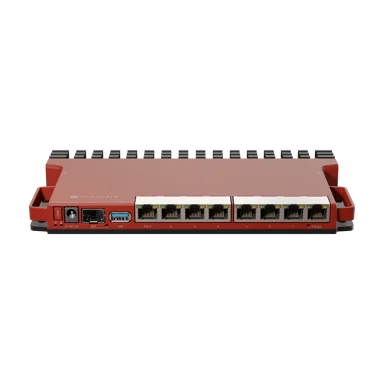
MikroTik hEX S RB760iGS Router
A five-port Gigabit router with an SFP cage and PoE input. The hEX S is a reliable, affordable option for small networks and customer premises where wireless is handled separately.
Key Features
- 5x Gigabit Ethernet and 1x SFP
- Dual-core CPU with 256 MB RAM
- PoE input on Ether1
- RouterOS L4 licence
Product Details
The following product description is prepared for Jupitaz Kenya, following your ecommerce SEO master outline. It includes verified specifications, buyer-focused benefits, applications, installation instructions, advantages and disadvantages, troubleshooting, FAQs, internal links, and your four supplied external links.
One important distinction: MikroTik RB760iGS is the original hEX S, not the newer hEX S (2025), model E60iUGS. They have different processors, memory, USB interfaces and SFP capabilities. The description below uses only the specifications of the RB760iGS.

MikroTik hEX S RB760iGS Router
Manufacturer: MikroTik
Product code: RB760iGS
Price: Call for Price
Availability and price checked October 9, 2026.
Complete ecommerce product description
MikroTik hEX S RB760iGS Router Price in Kenya – 5-Port Gigabit Router with SFP and PoE
MikroTik hEX S RB760iGS Router Overview
The MikroTik hEX S RB760iGS Router is a compact, professional-grade Gigabit Ethernet router designed for homes, small businesses, offices, internet service providers (ISPs), hotspot networks and advanced networking environments that require reliable wired connectivity and flexible network management.
Powered by a MediaTek MT7621A dual-core 880MHz processor with four threads, the hEX S combines five Gigabit Ethernet ports, one Gigabit-class SFP interface, 256MB RAM, USB 2.0 connectivity, microSD storage support and advanced RouterOS networking capabilities.
One of the main advantages of the MikroTik RB760iGS is its ability to manage different network functions from a single compact device. Users can configure firewall rules, VLANs, bandwidth limits, VPN connections, DHCP services, HotSpot authentication and PPPoE connections through MikroTik RouterOS.
Unlike ordinary home routers that offer limited configuration options, the MikroTik hEX S provides detailed control over network traffic, connected devices and internet access policies.
For Kenyan internet service providers, ICT technicians and network administrators, the RB760iGS offers an affordable option for installing small office networks, managing business internet connections, configuring hotspot billing systems and connecting compatible fibre infrastructure.
The router also supports passive Power over Ethernet (PoE) output on Ethernet port 5, allowing it to supply power to a compatible passive-PoE device without requiring a separate power adapter at the receiving end.
Its dedicated SFP interface provides additional connectivity for compatible fibre-optic installations, making the device useful in deployments where Ethernet and fibre networking must work together.
The MikroTik hEX S RB760iGS does not have built-in Wi-Fi. To provide wireless internet connectivity, users must connect a separate wireless access point.
Whether you are installing internet at a small office, managing a guest network or upgrading an existing wired network, the MikroTik hEX S offers a versatile RouterOS platform for professional network management.
Buy the MikroTik hEX S RB760iGS Router in Kenya from Jupitaz Networking Solutions and explore networking equipment for homes, businesses and ISP installations.
MikroTik hEX S RB760iGS Price in Kenya
The MikroTik hEX S RB760iGS price in Kenya depends on supplier pricing, stock availability, exchange rates and the additional accessories required for installation.
At Jupitaz, the router is currently listed as Call for Price. Customers should request an updated quotation to confirm the current selling price before ordering.
The final cost of a complete network installation may include additional equipment such as:
-
Gigabit Ethernet cables
-
Compatible SFP transceivers
-
Fibre optic patch cords
-
Wireless access points
-
Network switches
-
PoE injectors where required
-
Network installation and configuration services
The MikroTik hEX S is suitable for buyers who need advanced RouterOS functionality without purchasing a larger enterprise router.
It combines Gigabit connectivity, configurable routing, VPN support and passive PoE output in a compact design.
Customers looking for alternative equipment can compare models in the MikroTik routers category at Jupitaz.
Key Features and Benefits of MikroTik hEX S RB760iGS
1. Dual-Core 880MHz Processor for Network Management
The MikroTik hEX S RB760iGS uses the MediaTek MT7621A processor, based on the MMIPS architecture.
The processor operates at a nominal frequency of 880MHz and includes two CPU cores with four processing threads.
This hardware enables the router to perform a wide range of networking tasks, including:
-
Internet routing and network address translation
-
Firewall filtering and connection tracking
-
DHCP server and client services
-
VLAN management and network segmentation
-
Bandwidth queues and traffic shaping
-
HotSpot services
-
PPPoE client and server configuration
-
Compatible VPN connections
-
Basic dynamic routing and network monitoring
For small offices and hotspot operators in Kenya, these capabilities allow one router to manage several essential network services.
However, processor-intensive configurations involving large numbers of queues, complex firewall rules or encrypted VPN traffic can affect throughput.
The RB760iGS should therefore be selected according to the expected network workload rather than assuming that every configuration will operate at full Gigabit speed.
2. Five Gigabit Ethernet Ports
The MikroTik RB760iGS features five 10/100/1000Mbps Ethernet ports.
These provide wired connectivity for equipment such as computers, switches, access points, servers, fibre ONTs and other routers.
Each port can negotiate a maximum link speed of 1Gbps when connected to compatible equipment.
RouterOS allows administrators to assign individual interfaces to different network roles.
For example, an installation can use:
-
Ether1: Internet WAN connection
-
Ether2: Office or administrator LAN
-
Ether3: Guest or hotspot network
-
Ether4: Network switch connection
-
Ether5: Compatible passive-PoE networking device
This is an example configuration rather than a fixed port assignment. RouterOS interfaces can be customised according to the network design.
The Gigabit interfaces make the router suitable for broadband connections, small business networks, managed internet installations and local network communication.
For installations requiring more wired connections, the router can be connected to a Gigabit network switch from Jupitaz.
3. SFP Interface for Fibre Optic Connectivity
The hEX S RB760iGS includes one SFP cage supporting compatible Gigabit-class optical modules.
MikroTik describes the port as a 1.25Gbps SFP cage, suitable for supported Gigabit fibre connections.
This provides flexibility for networks that require connections through fibre optic cables rather than traditional copper Ethernet.
Common applications include:
-
Fibre links between buildings
-
Connecting compatible network switches
-
Fibre-based business networking
-
Network distribution infrastructure
-
Compatible point-to-point fibre links
-
Connecting to supported ISP Ethernet fibre equipment
The appropriate optical transceiver must be selected according to the fibre type, wavelength, connector and intended transmission distance.
Important: The RB760iGS does not include a 10Gbps SFP+ interface. Its SFP port is designed for Gigabit-class connectivity.
It also does not automatically replace a GPON or EPON ONT used by a fibre internet service provider.
Customers building fibre infrastructure can browse fibre optic networking equipment for compatible installation accessories.
4. 256MB RAM for RouterOS Operations
The MikroTik hEX S includes 256MB RAM, providing memory for the RouterOS operating system and supported network services.
RAM is used for tasks such as connection tracking, network management, routing processes and supported VPN services.
For typical small business environments, the available memory provides useful resources for normal RouterOS configurations.
However, the RB760iGS is not designed to replace high-performance enterprise routers managing very large routing tables or extremely demanding subscriber networks.
For growing internet service providers, it is important to evaluate processor utilisation, memory consumption and traffic volume before increasing the number of customers served by the router.
5. RouterOS Level 4 Licence Included
The MikroTik RB760iGS comes with RouterOS and a Level 4 licence.
RouterOS is MikroTik's professional networking operating system, providing access to a wide range of configuration and management tools.
Supported features include:
-
IPv4 and IPv6 configuration
-
Static and dynamic routing
-
Network address translation
-
Stateful firewall filtering
-
VLAN configuration
-
DHCP server and client
-
PPPoE services
-
HotSpot authentication
-
Traffic queues and bandwidth management
-
Compatible VPN protocols
-
Network diagnostics and monitoring
-
Configuration scripting and scheduling
The RouterOS licence is included with the device, so buyers do not need to purchase an additional standard RouterOS licence to begin using the supported functions.
The router can run compatible RouterOS v7 releases for its MMIPS architecture.
6. Passive PoE Output on Ethernet Port 5
A major advantage of the MikroTik hEX S over some basic wired routers is its ability to provide passive Power over Ethernet output through ether5.
This allows the router to supply power and Ethernet connectivity to a compatible device using one cable.
Suitable applications may include powering certain MikroTik wireless devices, small access points or compatible outdoor radios.
The PoE output voltage follows the voltage supplied to the router, subject to the device's electrical limits.
The manufacturer's maximum PoE output current specification is 500mA.
Important PoE compatibility information:
The RB760iGS provides passive PoE output, not universal IEEE 802.3af/at PoE output.
The connected device must support the supplied voltage, passive PoE pinout and available power.
Connecting incompatible equipment can result in malfunction or damage.
For networks requiring multiple powered access points or IP cameras, a dedicated PoE switch is usually a more appropriate solution.
7. Flexible PoE Input and DC Power
The hEX S can receive power through its DC input jack or supported PoE input on ether1.
MikroTik specifies a 12–57V input range and lists 802.3af/at PoE input compatibility.
This flexibility allows installers to select a suitable power arrangement for the network environment.
For example, an installation can use the manufacturer's supplied power adapter or a compatible PoE power source.
Power compatibility should always be checked before installation, particularly when using alternative injectors or switches.
8. IPsec Hardware Encryption Support
The MikroTik RB760iGS supports hardware-assisted IPsec encryption.
This can improve performance for compatible IPsec VPN configurations when compared with encryption performed entirely in software.
VPN connectivity is useful for businesses that need secure connections between offices or remote network locations.
Possible applications include:
-
Connecting branch offices to headquarters
-
Securing communication between business sites
-
Enabling remote administration
-
Establishing encrypted site-to-site tunnels
-
Protecting data exchanged across public networks
Actual VPN performance depends on the encryption algorithm, tunnel configuration, packet size and RouterOS settings.
Not every VPN technology benefits from IPsec hardware acceleration.
9. USB 2.0 Port for Compatible Peripherals
The RB760iGS includes one USB Type-A interface supporting USB 2.0.
The port can be used with supported USB peripherals, including suitable storage devices, depending on RouterOS compatibility.
This provides additional flexibility for specialised network management requirements.
The USB connection should not be confused with an integrated 4G or 5G cellular modem.
Mobile broadband functionality requires a compatible external modem and appropriate RouterOS configuration.
10. microSD Slot for Additional Storage
Another useful feature of the MikroTik hEX S is its microSD card slot.
This allows compatible removable storage to be added for supported RouterOS applications.
MikroTik specifically identifies microSD storage as useful for improving file-storage read and write performance for suitable applications, including The Dude network monitoring package.
Actual functionality depends on the installed RouterOS release and application compatibility.
11. Compact and Fanless Design
The RB760iGS measures approximately 113 × 89 × 28mm.
Its compact enclosure makes it suitable for desk installations, office shelves and small networking cabinets.
The router uses passive cooling and does not contain a built-in fan.
This eliminates fan noise and reduces the maintenance associated with mechanical cooling components.
Although the router is compact, adequate ventilation and a suitable operating environment are still necessary.
Its IP20 enclosure is intended for protected indoor installations and should not be exposed directly to rain, dust-heavy outdoor environments or water.
MikroTik hEX S RB760iGS Technical Specifications
| Specification | Details |
|---|---|
| Manufacturer | MikroTik |
| Product name | MikroTik hEX S |
| Exact model | RB760iGS |
| Architecture | MMIPS |
| Processor | MediaTek MT7621A |
| CPU cores | 2 |
| CPU threads | 4 |
| CPU frequency | 880MHz |
| Switch chip | MT7621A |
| RAM | 256MB |
| Storage | 16MB Flash |
| Ethernet ports | 5 × 10/100/1000Mbps |
| SFP ports | 1 |
| SFP interface class | 1.25Gbps / Gigabit-class |
| SFP+ 10Gbps | Not supported |
| USB | 1 × USB 2.0 Type-A |
| USB maximum current | 1A |
| microSD slot | 1 |
| Operating system | MikroTik RouterOS |
| RouterOS licence | Level 4 |
| RouterOS v7 compatibility | Supported MMIPS releases |
| Built-in Wi-Fi | No |
| PoE input | Ether1, IEEE 802.3af/at compatible |
| PoE output | Ether5, passive PoE |
| PoE output current limit | 500mA |
| DC jack voltage | 12–57V |
| PoE input voltage | 12–57V listed by manufacturer |
| Number of power inputs | 2 |
| Maximum power consumption | 24W |
| Power consumption without attachments | 6W maximum |
| Cooling | Passive |
| Dimensions | 113 × 89 × 28mm |
| Tested ambient temperature | -40°C to +70°C |
| Protection rating | IP20 |
| Intended use | Indoor |
| IPsec hardware encryption | Supported |
These specifications apply to the original MikroTik RB760iGS hEX S.
Model identification: The newer hEX S (2025), product code E60iUGS, is a different router with different processor, RAM, storage, USB and SFP specifications. Buyers should confirm the exact model code before ordering.
Practical Applications of MikroTik hEX S RB760iGS in Kenya
1. Small Office and Business Networks
The MikroTik hEX S is suitable for small office networks that require more advanced management than a typical home router provides.
Businesses can configure separate network segments, firewall policies and bandwidth limits to control how staff and connected devices access the internet.
For example, an office can use the RB760iGS to manage its internet gateway while connecting computers, printers, surveillance equipment and access points through a suitable switch.
The router can also support VLANs for separating guest traffic from sensitive business systems.
This is useful for businesses where network security and traffic management are important.
2. Hotspot Billing and Wi-Fi Businesses
The MikroTik hEX S RB760iGS can be used as the wired gateway in small hotspot installations.
RouterOS supports HotSpot authentication, user profiles, bandwidth limits and integration options for compatible third-party billing systems.
This makes the router relevant to managed Wi-Fi services in locations such as:
-
Small apartment buildings
-
Guesthouses
-
Cafés and restaurants
-
Small hotels
-
Shops and commercial premises
-
Community internet installations
A hotspot network generally requires separate wireless access points to provide customer Wi-Fi coverage.
The RB760iGS can manage network addressing, authentication and routing while the connected access points handle wireless connectivity.
The practical number of hotspot users depends on traffic consumption, queues, authentication methods and RouterOS configuration. It is not appropriate to promise a fixed maximum number of active users without testing.
3. Internet Service Providers and WISPs
For small internet service providers, the RB760iGS can perform useful customer-edge and network-gateway functions.
RouterOS supports PPPoE, routing, bandwidth controls and firewall services that can be used in suitable ISP configurations.
The Gigabit Ethernet ports allow connection to switches, subscriber-facing equipment and upstream internet sources.
Its SFP interface can provide connectivity to compatible Gigabit fibre infrastructure.
For larger ISP deployments, a more powerful router may be necessary to manage higher aggregate traffic and processor-intensive services.
Compare other MikroTik routers for ISP networks before selecting equipment for a high-capacity installation.
4. Fibre Internet Connections
The hEX S is suitable for business and residential fibre internet connections delivered through compatible Ethernet equipment.
Where an ISP provides an ONT with an Ethernet output, the ONT can connect to one of the router's Ethernet ports.
The administrator can then configure DHCP, PPPoE or static IP addressing according to the ISP's requirements.
The SFP cage provides additional Gigabit fibre connectivity when a suitable supported optical module is installed.
The router does not automatically replace the optical termination equipment required for GPON or EPON connections.
Customers planning fibre installations can explore fibre optic equipment and accessories.
5. CCTV and IP Surveillance Networks
The MikroTik RB760iGS can provide routing, firewall and VLAN services for CCTV installations.
For example, a business can configure a dedicated surveillance network and restrict access to the network video recorder.
This can reduce unnecessary communication between surveillance devices and ordinary office computers.
A compatible PoE switch may be required when cameras need Ethernet-based power.
The single passive PoE output on ether5 should not be treated as a general-purpose PoE supply for multiple CCTV cameras.
6. Starlink Internet Networking
The MikroTik hEX S can be used with a compatible Starlink Ethernet connection to provide additional local network control.
For example, a home or office can use the RB760iGS for firewall management, DHCP services, VLANs and bandwidth queues.
The installation may require an Ethernet adapter or supported Ethernet connection method, depending on the Starlink hardware.
The RB760iGS does not have built-in Wi-Fi, so separate access points are required if wireless coverage is needed.
Its Gigabit Ethernet interfaces are appropriate for many broadband installations, but actual throughput depends on the Starlink service and the router's configuration.
7. VPN Connections Between Offices
Businesses operating from multiple locations can use compatible RouterOS VPN functions to establish secure network connections.
IPsec hardware encryption is a particularly useful feature of the RB760iGS.
For instance, a small business may create a site-to-site VPN connecting two offices, allowing authorised devices to access selected network resources.
Firewall policies, routing and authentication settings must be configured correctly at both endpoints.
VPN throughput should be tested under the expected workload.
8. Home Laboratories and Advanced Home Networks
Networking enthusiasts and IT professionals can use the MikroTik hEX S to practise RouterOS configuration and build advanced home networks.
Its capabilities include VLAN routing, firewall configuration, VPNs, queues, DHCP and traffic monitoring.
The compact enclosure, Gigabit interfaces and passive cooling make it useful for learning and testing networking concepts.
It can also serve as the main gateway for a home network using separate Wi-Fi access points.
MikroTik hEX S RB760iGS Advantages and Disadvantages
Advantages
-
Five Gigabit Ethernet ports: Provides flexible wired connectivity for small networks.
-
Dedicated SFP interface: Supports compatible Gigabit fibre connections.
-
Dual-core processor: Offers processing resources for ordinary routing and network-management tasks.
-
RouterOS Level 4: Provides extensive routing, firewall and bandwidth-control features.
-
Passive PoE output: Ether5 can power a compatible device.
-
PoE input support: Allows flexible power arrangements.
-
IPsec hardware acceleration: Supports suitable encrypted VPN applications.
-
USB and microSD connectivity: Provides options for supported additional storage and peripherals.
-
Fanless design: Operates without fan noise.
-
Compact enclosure: Suitable for space-limited installations.
Disadvantages and Limitations
-
No built-in Wi-Fi: Requires a separate access point for wireless connectivity.
-
No 10Gbps SFP+: The SFP interface is limited to Gigabit-class connectivity.
-
256MB RAM: Less suitable for very large or resource-heavy network configurations.
-
RouterOS learning curve: Advanced configurations require networking knowledge.
-
Only five Ethernet ports: Larger wired networks need additional switches.
-
Passive PoE output only: Connected powered devices must be electrically compatible.
-
USB 2.0 rather than USB 3.0: Limits peripheral data-transfer performance.
-
Routing throughput varies: Complex firewall rules, queues and VPN encryption may reduce performance.
-
Indoor enclosure: Not suitable for unprotected outdoor installations.
How to Set Up MikroTik hEX S RB760iGS Using Winbox
The MikroTik hEX S can be configured using Winbox, WebFig or RouterOS command-line tools.
The following setup procedure is suitable for a basic office or home network using an Ethernet internet connection.
Previously configured units may have different settings from the factory defaults.
Step 1: Prepare the Router and Required Equipment
Before installation, make sure you have the RB760iGS router, its compatible power adapter, Ethernet cables, a computer and an active internet connection.
If wireless internet is required, prepare a separate wireless access point.
If connecting fibre equipment through SFP, ensure the optical module is compatible with the router and link partner.
Step 2: Connect the Power Supply
Connect the supplied compatible DC power adapter to the router.
Alternatively, use a supported PoE input source on ether1.
Confirm that the power source matches the router's electrical requirements.
Avoid connecting unknown or incompatible PoE power sources.
Step 3: Connect the Internet Cable
For the standard default configuration, connect the Ethernet cable from the ISP modem, fibre ONT or upstream gateway to ether1.
This port is typically configured as the WAN interface in MikroTik's factory-default setup.
If the router has been reset without defaults, or previously configured, the WAN settings may need to be established manually.
Step 4: Connect a Computer to the LAN
Connect your computer to ether2 or another configured LAN port.
Set the computer to obtain an IP address automatically.
With a standard factory configuration, the router normally uses 192.168.88.1 as its LAN gateway address.
Step 5: Access the Router Through Winbox
Open MikroTik Winbox.
Navigate to the Neighbors tab and select the router if it is discovered.
You can also connect using the management IP address where it is reachable.
For a factory-default unit, the administrator username is generally admin; the initial password may be blank or supplied on the device label, depending on the unit.
Set a strong administrator password immediately.
Step 6: Configure Internet Settings
In Winbox, open:
IP → DHCP Client
If the upstream internet connection uses DHCP, configure or confirm a DHCP client on the WAN interface.
For PPPoE connections, open:
PPP → Interfaces → PPPoE Client
Enter the username and password supplied by your internet service provider.
For a static IP connection, enter the assigned IP address, gateway and DNS configuration.
Verify the default route and internet reachability before proceeding.
Step 7: Configure LAN Addressing
Open:
IP → Addresses
Assign the intended gateway address to your LAN bridge or interface.
For example:
192.168.10.1/24
This is an example subnet rather than a manufacturer-required address.
Ensure the selected subnet does not overlap with existing network segments.
Next, open:
IP → DHCP Server
Configure a DHCP server and address pool for the appropriate LAN interface.
Step 8: Configure NAT and Firewall Rules
For a typical IPv4 internet-sharing installation, source NAT is used when private LAN addresses access the internet.
Open:
IP → Firewall → NAT
Confirm the required source NAT configuration is present.
Maintain suitable firewall rules to protect the router and LAN against unauthorised inbound connections.
If using MikroTik's default configuration, examine the existing rules before making changes.
Avoid deleting working firewall rules or bridge settings without understanding the effects.
Step 9: Configure HotSpot if Required
For a hotspot business, create a suitable client-facing bridge or VLAN.
For example, ether3 and ether4 could be assigned to a dedicated hotspot client network while ether1 remains connected to the WAN.
Open:
IP → Hotspot
Use the HotSpot setup wizard on the correct client-facing interface.
Configure the gateway IP address, DHCP service and authentication requirements.
For external hotspot billing platforms, confirm compatibility with RouterOS and the authentication or API functions required by the provider.
Keep the upstream WAN outside the hotspot client bridge unless a specifically designed network architecture requires otherwise.
Step 10: Configure PoE Output on Ether5
If connecting a compatible passive-PoE device to ether5, verify the required voltage, pinout and current consumption.
In Winbox, open the relevant Ethernet PoE settings.
Enable an appropriate supported PoE output mode.
Avoid forcing power onto a connected device unless electrical compatibility has been positively confirmed.
The output voltage depends on the router's input power source.
Step 11: Configure SFP Connectivity if Required
Insert a compatible SFP module and connect the appropriate fibre optic cable.
In Winbox, check the SFP interface status.
Confirm that the remote device and optical transceiver are compatible.
Where a fibre connection fails, check the wavelength, connector, fibre type, optical levels and interface negotiation.
Step 12: Secure the Router
Before production use:
-
Create a strong administrator password.
-
Disable unnecessary management services.
-
Restrict administrative access to trusted networks.
-
Configure suitable firewall rules.
-
Review DNS and routing settings.
-
Save a backup of the working configuration.
-
Install a compatible stable RouterOS update.
Use Safe Mode when applying potentially disruptive changes during an interactive session.
Step 13: Test Internet Connectivity
Once the configuration is complete, verify that the router has an appropriate WAN address and default route.
Use MikroTik Ping to test internet connectivity.
Confirm that DNS name resolution works and connected client devices receive valid DHCP addresses.
Finally, test internet browsing from a client computer or mobile device connected through a separate access point.
A successful ping from the router does not necessarily confirm that LAN clients can access the internet.
MikroTik hEX S RB760iGS Troubleshooting Guide
| Problem | Possible cause | Recommended solution |
|---|---|---|
| Router does not power on | Incorrect adapter or input voltage | Verify the power source and DC connection. |
| Cannot access Winbox | Incorrect IP or disconnected LAN | Check Ethernet connectivity and Winbox neighbor discovery. |
| No internet connection | WAN, DHCP, route, DNS or NAT issue | Verify internet settings and firewall rules. |
| LAN clients receive no IP | DHCP configuration problem | Check the DHCP server and LAN bridge. |
| HotSpot login page fails | Incorrect HotSpot interface or DNS | Check client addressing and HotSpot configuration. |
| SFP connection fails | Incompatible optical module or fibre | Check module, wavelength and peer configuration. |
| Ether5 PoE does not work | Incompatible device or insufficient power | Confirm passive PoE requirements and voltage. |
| Slow internet performance | Queue, firewall or CPU bottleneck | Monitor CPU, interfaces and RouterOS configuration. |
| Router inaccessible after configuration | Bridge, VLAN or management IP changes | Use an available recovery connection or restore backup. |
MikroTik hEX S RB760iGS Package Contents
The manufacturer's product information lists a 24V 1.2A power adapter with the original hEX S RB760iGS.
The standard purchase includes the router itself.
Other accessories such as Ethernet cables, SFP transceivers, fibre patch cords, microSD cards and wireless access points should not be assumed to be included.
Confirm the exact package contents with Jupitaz before purchase, especially for opened-box or refurbished equipment.
MikroTik hEX S RB760iGS vs Other MikroTik Routers
| Feature | hEX S RB760iGS | hEX RB750Gr3 | RB5009UG+S+IN |
|---|---|---|---|
| Ethernet ports | 5 × Gigabit | 5 × Gigabit | 7 × Gigabit + 1 × 2.5G |
| SFP port | 1 × Gigabit-class | No | 1 × 10G SFP+ |
| Processor | Dual-core MT7621A | Dual-core MT7621A | Quad-core Marvell |
| RAM | 256MB | 256MB | 1GB |
| PoE output | Ether5 passive | No | No |
| RouterOS licence | Level 4 | Level 4 | Level 5 |
| Built-in Wi-Fi | No | No | No |
| Typical application | Small fibre, office and hotspot networks | Basic wired routing | More demanding business and ISP networks |
The original hEX S is attractive when a small network needs Gigabit Ethernet, an SFP interface and passive PoE output.
The hEX RB750Gr3 is a suitable alternative when SFP connectivity and PoE output are unnecessary.
For networks requiring 2.5GbE, 10Gbps SFP+ or more powerful processing, the RB5009 provides a higher-performance hardware platform.
Frequently Asked Questions About MikroTik hEX S RB760iGS
1. What is the MikroTik hEX S RB760iGS price in Kenya?
Jupitaz currently lists the router as Call for Price. Contact the store for an updated selling price and delivery quotation.
2. Is MikroTik hEX S RB760iGS a Gigabit router?
Yes. It includes five 10/100/1000Mbps Ethernet ports and one Gigabit-class SFP interface.
3. Does MikroTik RB760iGS have built-in Wi-Fi?
No. The router provides wired network connectivity. A separate wireless access point is required for Wi-Fi.
4. Can MikroTik hEX S be used for a hotspot billing system?
Yes. RouterOS supports HotSpot authentication and bandwidth management. Third-party billing integration depends on the platform and configuration.
5. Can the RB760iGS support PPPoE connections?
Yes. RouterOS supports PPPoE client and server configurations.
6. Does MikroTik RB760iGS support fibre internet?
Yes, through compatible Ethernet fibre termination equipment or a supported SFP module. It does not automatically replace a GPON ONT.
7. Does hEX S have PoE output?
Yes. Ether5 supports passive PoE output for compatible equipment.
8. Can the RB760iGS support 100 or more hotspot users?
The actual number depends on traffic consumption, connection handling, bandwidth queues, firewall configuration and other factors. No fixed capacity should be guaranteed without testing.
9. Does MikroTik hEX S support VPN connections?
Yes. RouterOS supports compatible VPN protocols, and the RB760iGS includes hardware support for IPsec encryption.
10. Is the MikroTik RB760iGS suitable for a small office?
Yes. It is suitable for small office networks requiring wired internet routing, DHCP, firewall protection and VLAN management.
11. Can the router work with Starlink Internet?
Yes. It can use a compatible Ethernet connection from Starlink equipment, with configuration based on the Starlink hardware and network design.
12. Is MikroTik hEX S RB760iGS the same as hEX S 2025?
No. RB760iGS is the original hEX S. The newer hEX S 2025 uses product code E60iUGS and has different specifications.
13. Does RB760iGS support USB storage?
Yes. It includes a USB 2.0 Type-A interface for supported USB peripherals.
14. Can I connect an access point to the router?
Yes. A compatible wireless access point can connect through an Ethernet port or a downstream switch. If powering through ether5, passive PoE compatibility must be confirmed.
15. Does MikroTik RB760iGS support VLANs?
Yes. RouterOS supports VLAN interfaces and suitable bridge VLAN configurations.
Why Buy MikroTik hEX S RB760iGS from Jupitaz Kenya?
Jupitaz supplies networking equipment for Kenyan homes, businesses, ICT professionals, installers and internet service providers.
Customers can explore routers, managed switches, wireless access points, fibre optic accessories and other networking products for complete installations.
The MikroTik hEX S RB760iGS is an option for buyers requiring professional network management without purchasing a large enterprise router.
For businesses and technicians planning a complete installation, selecting compatible switches, Ethernet cables, fibre modules and access points is essential for reliable network operation.
Explore the Jupitaz MikroTik router catalogue to compare equipment for different project requirements.
Buy MikroTik hEX S RB760iGS Router in Kenya
Upgrade your wired network with the MikroTik hEX S RB760iGS Router, featuring five Gigabit Ethernet ports, a Gigabit-class SFP cage, an 880MHz dual-core processor, 256MB RAM, RouterOS Level 4 and passive PoE output on ether5.
Suitable for small offices, fibre internet installations, compatible hotspot networks and professional RouterOS applications, the hEX S provides flexible configuration options in a compact, fanless design.
Order MikroTik hEX S RB760iGS Router from Jupitaz Kenya for current pricing, availability and ordering information.
You can also browse business and ISP routers in Kenya for alternative solutions.
External links for the product page
The four exact-product URLs you supplied are accessible. These should be incorporated into a natural, relevant paragraph rather than presented as unrelated backlinks.
Additional MikroTik RB760iGS Product References
For additional information about the MikroTik hEX S RB760iGS, customers can explore the MikroTik RB760iGS product listing at Orbitlink Solutions, review RB760iGS technical and setup information at MikroTik Kenya, and compare product information available from Reisen SEO and Tawa Kenya.
For purchases through Jupitaz, visit the MikroTik hEX S RB760iGS product page to confirm the current price and ordering arrangements.
SEO metadata for Jupitaz
Meta Title
CopyMeta Description
CopyPrimary Focus Keyword
MikroTik hEX S RB760iGS Router Price in Kenya
Secondary SEO Keywords
MikroTik RB760iGS Kenya, MikroTik hEX S price in Kenya, MikroTik 5 Port Gigabit Router, RB760iGS specifications, MikroTik hEX S setup, MikroTik SFP router Kenya, MikroTik hotspot router, MikroTik PoE router Kenya.
Existing Product URL
https://jupitaz.co.ke/product/mikrotik-router-hex-s-rb760igsKeep this existing URL to avoid unnecessary changes to indexing and internal links.Recommended internal linking and SEO implementation
The following relevant Jupitaz pages were verified and can support the product description.
|
Page |
Internal link |
|---|---|
|
Product category |
|
|
Related equipment |
|
|
Wireless expansion |
|
|
Fibre connectivity |
|
|
Power accessories |
|
|
Educational content |
For publication, I recommend adding Product and BreadcrumbList structured data, unique product-image alt text, and links from relevant categories. Keep the product's actual price, stock status, warranty terms and SKU consistent between the visible page and any structured data.
Official manufacturer references: MikroTik hEX S RB760iGS product specifications and MikroTik hEX S (2025) comparison. These confirm the distinction between the original RB760iGS and the newer E60iUGS.
The content is ready to transfer into the Jupitaz product editor, with the technical specifications, detailed benefits, setup instructions, buying guidance and SEO metadata tailored to the original MikroTik hEX S RB760iGS.
Technical Specifications
| Ports | 5x Gigabit, 1x SFP |
|---|---|
| CPU | MediaTek MT7621A dual-core 880 MHz |
| RAM | 256 MB |
| PoE | 802.3af/at input on Ether1 |
Why Buy From Jupitaz
Jupitaz is a networking-focused equipment supplier serving customers in Kenya. We list a specialist range of routers, switches, wireless and fibre products so you can compare current pricing and availability in one place. Our team can help you choose the right equipment for home, business, ISP or FTTH projects, and delivery options are available across Kenya.
Frequently Asked Questions
Related Products